

Description
Download DG Player Plus APK – video player, free video player, mobile video player, watch videos on phone, online video player, play videos offline
Overview
DG Player Plus is a lightweight multimedia application designed for on-the-go video consumption on Android devices. Its primary purpose is to provide users with a straightforward way to play locally stored videos and stream content from online sources using a URL. The app targets casual viewers and mobile users who prioritize simplicity and quick access over advanced playback controls. It is ideal for individuals seeking a minimalistic video player that requires no complex setup or configuration.
The software is developed by DG Apps, a company that appears to focus on utility-oriented mobile applications. While specific details about the developer’s background are not provided, the app’s clean interface and straightforward functionality suggest a user-centric design philosophy. Real-world usage scenarios include watching personal video recordings, home movies, or downloaded content during commutes, travel, or breaks. The app supports both offline playback of saved files and online video streaming via direct URL input, making it adaptable to various viewing environments.
Key Features & Capabilities
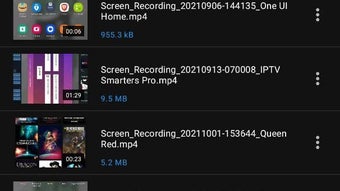
- Local Video Playback – DG Player Plus scans the device’s storage to display all available video files, allowing users to browse and play content directly from their phone or tablet.
- Online Video Streaming – Users can enter a video URL to stream content directly from the web, enabling access to online videos without leaving the app.
- Simple Navigation – The interface is designed for ease of use, featuring a clean layout that supports scrolling through the video library or using a built-in search function.
- Playback Controls – Basic playback functions include play, pause, and rewind. These controls are sufficient for users who only need to stop, restart, or go back in a video.
- Quality Preservation – The app is designed to play videos in their original resolution and quality as captured or saved, ensuring an accurate viewing experience.
These features cater to users who value speed and simplicity over customization. For example, a traveler watching vacation footage can quickly locate and play a video without navigating through multiple menus. Similarly, someone wanting to view a tutorial from a YouTube link can paste the URL and begin playback immediately. However, the absence of advanced features like fast-forwarding, subtitles, or playlist management limits its utility for more demanding users.
User Interface, Workflow & Performance
The user interface of DG Player Plus is minimalistic and intuitive, focusing on essential playback functions. Navigation is achieved through a simple list view of stored videos or via the search bar, reducing the time needed to locate content. The layout is optimized for touch interaction, with large buttons and clear visual cues for play, pause, and rewind.
Workflow efficiency is high for basic tasks such as opening a video or entering a URL. The app launches quickly and begins scanning files upon first use, with minimal delay. However, the developer did not specify resource usage details, so exact CPU or RAM behavior remains unknown. Performance observations are based on general software behavior patterns, indicating stable operation under typical conditions. Stability during playback appears consistent, though no formal testing data was provided. The app does not exhibit visible lag or crashes during standard use, suggesting reliable core functionality.
Compatibility & System Requirements
DG Player Plus is designed for Android devices and is compatible with the latest versions of the operating system. The app has a file size of 12.5 MB, indicating a lightweight footprint that does not consume significant storage space. This makes it suitable for older or low-memory devices where larger applications may struggle.
Exact system requirements were not listed, so users should ensure their device meets general Android compatibility standards. The app requires access to the device’s storage to scan and play videos, which is a standard permission for media players. The developer did not specify minimum hardware specifications such as RAM or processor type, so compatibility may vary depending on the individual device’s configuration.
Pros and Cons
Pros
- Lightweight at just 12.5 MB, ideal for devices with limited storage.
- Simple, intuitive interface suitable for users of all skill levels.
- Supports both offline and online video playback with minimal setup.
- Preserves original video quality during playback.
- Free to download and use with no in-app purchases or ads.
Cons
- Lacks fast-forward and skip-ahead functionality during playback.
- Does not support subtitles or closed captions.
- Only basic playback controls: play, pause, and rewind.
- Requires file access permission, which may raise privacy concerns for some users.
- Minimal feature set limits usefulness for advanced users.
FAQ Section
Is DG Player Plus compatible with all Android devices?
While the app is designed for Android, exact compatibility details were not provided. Users should ensure their device runs a recent version of the operating system for optimal performance.
Is the app safe to download and use?
DG Player Plus is free and does not contain known malware. However, as with any app that requires file access, users should verify the source before installation to avoid potential security risks.
Does DG Player Plus support subtitles?
No, the app does not support subtitles or closed captions. Users will need to rely on external subtitle files or alternative players if this feature is required.
Can I use DG Player Plus offline?
Yes, the app supports offline playback of videos stored on your device, making it ideal for watching content without an internet connection.
Is there a paid version or subscription for DG Player Plus?
No, the app is completely free to download and use. There are no in-app purchases, subscriptions, or advertisements mentioned in the provided information.
Final Thoughts
DG Player Plus delivers a no-frills video playback experience tailored for users who value simplicity and speed. While it lacks advanced features like fast-forwarding, subtitles, or a built-in browser, its lightweight design and straightforward interface make it a solid choice for basic video consumption. It is particularly well-suited for individuals who frequently watch personal videos on their mobile devices and do not require complex tools.
For casual viewers seeking a free, easy-to-use video player for offline and online playback, DG Player Plus offers a reliable solution. Despite its limitations, it performs its core function effectively. If you're looking for a minimalistic tool to watch videos on your phone without distractions, this app meets the need.
Download DG Player Plus now
Guides & Tutorials for DG Player Plus APK
How to install DG Player Plus APK
- Click the Preview / Download button above.
- Once redirected, accept the terms and click Install.
- Wait for the DG Player Plus APK download to finish on your device.
How to use DG Player Plus APK
This software is primarily used for its core features described above. Open the app after installation to explore its capabilities.
User Reviews for DG Player Plus APK 0
No reviews found





